
How to read a check. How to read MICR codes:
- What are the different areas of a check?
- How do I read the MICR or check code line?
- What are the features of a check.
- How can I understand the layout of a check?
The Parts of a Check:
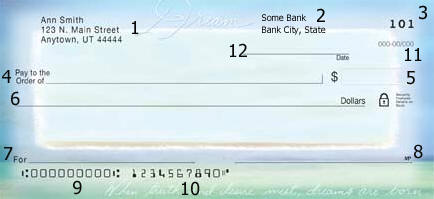
1. Account Holder Name, Accounholder Address, Accountholder Phone number, and Accountholder Email Address can appear in this section of the check called the Address Field.
2. The Bank Name, City and State of the processing facility, or the city and state of the account older's branch, the bank's phone number, the banks website address and/or the bank's email address may appear in this section. This section can also be located above field 7, the memo field. 3. The check number appears at the top right, shown here as 101.
3. The check number appears at the top right, shown here as 101.
4. Pay to the order of: This section should have the name of the person or company that is being paid. The name of the party getting the money.
5. The amount written numerically. If this check were for one hundred dollars, within the box labeled "5" in the example above, it should read, "$100.00"
6. The amount written in words. If this check were for $100, in the blank labeled "6" above, you would write, "One Hundred and 00/100". Many people will then draw a line to the preprinted "Dollars" to discourage alteration. If the check were for $101.59, it would be written, "One Hundred One and 59/100".
7. The 'For" or "Memo" blank can be left blank, or you can enter any information at all. Some people note an account number or invoice number that is being paid with the check, others may just write, "For Birthday" or other note to remind them what the check was for. This field is not read by the bank and does not change how the check is processed.
8. The signature line. This is where the account holder would sign the check. On a check draft, the signature is not required, although it is usual to have a signature disclaimer in this section.
9. This MICR field is the Routing Number. This is the 9 digit code that routes the check to the issuing bank. The routing number should match the bank name and the fraction code.
10. The account number. This field is an MICR field that lists the account holder's account number at the bank.
11. Fraction Code - this field is the fraction that denotes the routing for the check. The fraction code is another way to write the 9 digit routing number. If the MICR line on the check is mutilated, the fraction code will be used in its place.
12. The date field. Fill this in with the date the check is created.
Protection:
Use services that will check the validity of your checks and drafts before you deposit the items. If you don't know how to contact the bank once the check is returned, call the bank phone number. You can use RoutingTool to verify the Routing Number or BetterCheck to verify the check.
- Reasons For Return Main Page
- Not Sufficient Funds
- Uncollected Funds Hold
- Stop Payment
- Closed Account
- Unable to Locate Account
- Frozen Account
- Refer to Maker
- Not Authorized